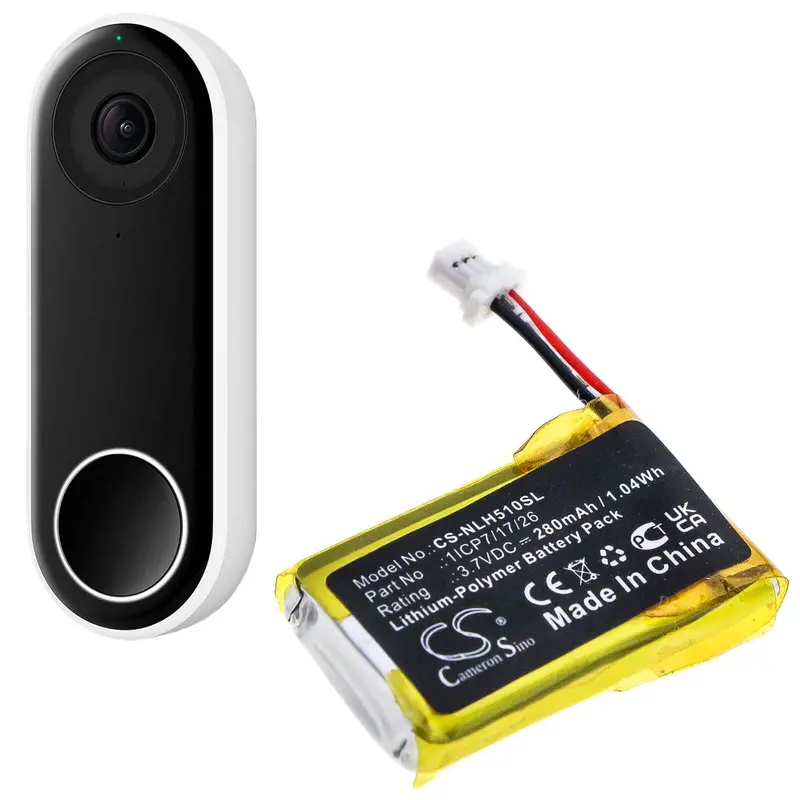

Description
Cameron Sino CS-NLH510SL Replacement Battery for Nest Home Security Cameras – 280mAh
Enhance the performance of your Nest Home Security Camera with the Cameron Sino CS-NLH510SL replacement battery. Designed for reliability and longevity, this 280mAh Li-Polymer battery ensures that your Nest Hello and related devices remain powered for optimal security and convenience. With a voltage rating of 3.7V and a power capacity of 1.04Wh, this battery delivers consistent performance to keep your home secure without interruptions.
Product Features:
- Battery Capacity: 280mAh
- Battery Type: Li-Polymer
- Voltage: 3.7V
- Power Rating: 1.04Wh
- Dimensions: 28.20 x 16.65 x 6.60mm
- Net Weight: 5.6g / 0.20oz
- Gross Weight: 30.6g / 1.08oz
- Color: Black
- EAN Code: 4894128169482
Benefits of Cameron Sino Batteries:
- Enhanced Performance: The CS-NLH510SL battery is specifically designed for seamless compatibility with Nest Hello and related models, providing consistent power for uninterrupted operation.
- Durable and Reliable: Built with high-quality components to ensure safety, durability, and efficiency.
- Compact Design: The lightweight and precise dimensions make installation quick and easy, fitting perfectly into your device.
- Safe Operation: Engineered to prevent overheating, short-circuiting, and overcharging, ensuring safe usage.
Compatible Models:
- Nest: Hello, NC5100US, C1241290, Video Doorbell Wired
Part Numbers:
- Nest: 1ICP7/17/26
30-Day Return & 1-Year Warranty:
Buy with confidence knowing that the Cameron Sino CS-NLH510SL replacement battery includes a 30-day return policy and a 1-year replacement warranty. Your satisfaction is guaranteed, and you can rely on this battery to keep your home security system running smoothly.
Power Your Security with Confidence!
Don’t let a failing battery compromise your home security. Equip your Nest Hello and other compatible models with the Cameron Sino CS-NLH510SL replacement battery for dependable performance, superior quality, and peace of mind. Secure your home today and enjoy the assurance of uninterrupted monitoring, day or night.
Hello Step-by-Step Instructions
Step 1 – Removing the Faceplate
Carefully insert an opening pick between the black front panel and the white body of your Nest Hello. Gently pry to separate the faceplate from the rest of the unit.
For first-time openings, you’ll encounter a foam mesh layer that’s glued to the casing. Use the pick to slice through the mesh as much as possible.
Firmly pull to detach the faceplate completely—it might take a bit of force.
Step 2 – Unscrewing the Internal Screws
Peel back any stickers covering the screw heads. Using your Phillips #000 screwdriver, remove all four screws holding the internal structure in place.
Step 3 – Separating the Casing
Insert an opening pick between the white outer casing and the internal black circuitry. Gently pry them apart.
Important: Be cautious—there’s a ribbon cable connecting the shell to the internal components. Avoid yanking or pulling too hard to prevent damage.
Step 4 – Disconnecting and Removing the Battery
With the rear casing removed, unplug the battery connector and lift out the old battery from its compartment.
Wrapping Up
To reassemble your device, simply reverse the order of the steps above.
Explore more from our collection.

Reviews
There are no reviews yet.